How often do you see this error in your database alert log file when you have “db_recovery_file_dest_size” parameter configured and Archive log destination is set to use Recovery File Destination. There is no harm or problem in this approach as long as you are following all the right practices of cleaning up the FRA/Recovery destination.
There is a common scenario that where this destination fills up to the Top or you have reached the size as specified by “db_recovery_file_dest_size” parameter.
Issue:
ORA-19815: WARNING: db_recovery_file_dest_size of xxxxx bytes is 100.00% used, and has 0 remaining bytes available.
Cause:
- Recovery Destination is full
- Recovery Destination has reached the upper limit as defined by Size parameter.
- (Most probably): files in the Recovery Destination have been removed manually and database metadata is not updated because of this.
Solution:
- For Issues 1 and 2 where in Recovery Destination is full: Clean the destination using proper method like Using Rman, backup and delete the Archive logs.
- Then there is a scenario that as per Database Views/Metadata, Recovery Destination is full but when you check on the OS/storage level, there is plenty of space available. This means there has been some clean up performed in past which was not according to the correct procedure. Lets see this
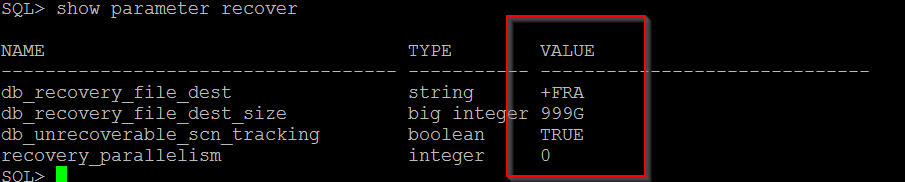
Recovery Destination Parameters Configuration
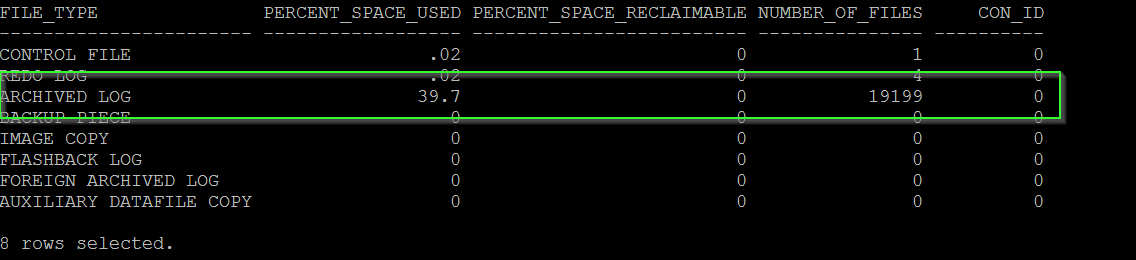
On Querying V$Flash_Recovery_area_usage, we know that Recovery destination has been fully consumed.
select * from v$flash_recovery_area_usage
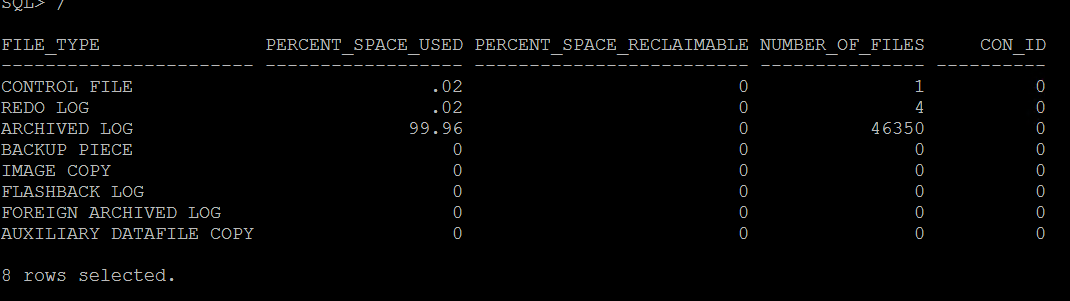
So As per this, FRA is almost 100% full.
When we check the FRA destination for available space and utilized space, It was not the case

So FRA is approximately half utilized.
Question: Why Database Server is reporting it otherwise?
Answer is, someone manually deleted the Archive logs from the Archive Destination and Database has no automatic way to diagnose that. And as per Database dictionary views, Destination should have been filled completely going by the number and size of Archive logs generated till now since last ethical Archive Log removal.
So the solution to this problem is to Update Database Metadata/repository with the correct and current actual information.
We can do that with RMAN using 2 commands, Crosscheck and Delete.
First, Run Crosscheck command for Archivelogs
crosscheck archivelog all;
Second, Delete the Expired Archive Logs
delete expired archivelog all;
Once, both of the above commands are completed, check the “v$flash_recovery_area_usage” to confirm that correct information is being reflected for used space for Archive logs.